Python Notes
Chapter 1 Elementary Programming
-
You can display any number of items in a
printstatement using the following syntax:print(item1, item2, ..., itemk)If an item is a number, the number is automatically converted to a string for displaying.
-
The following statement prompts the user to enter a value, and then it assigns the value to the variable:
variable = input("Enter a value: ")The value entered is a string. You can use the function
evalto evaluate and convert it to a numeric value.radius = eval(input("Enter a value for radius: ")) -
In some cases, the Python interpreter cannot determine the end of the statement written in multiple lines. You can place the line continuation symbol () at the end of a line to tell the interpreter that the statement is continued on the next line. For example, the following statement
sum = 1+ 2+ 3+ 4+ \
5+ 6
is equivalent to
sum = 1+ 2+ 3+ 4+ 5+ 6 -
Python also supports simultaneous assignment in syntax like this:
var1, var2, ..., varn = exp1, exp2, ..., expnIt tells Python to evaluate all the expressions on the right and assign them to the corresponding variable on the left simultaneously. Swapping variable values is a common operation in programming and simultaneous assignment is very useful to perform this operation. you can simplify the task using the following statement to swap the values of x and y.
x, y = y, x # Swap x with ySimultaneous assignment can also be used to obtain multiple input in one statement.
# Prompt the user to enter three numbers number1, number2, number3 = eval(input("Enter three numbers separated by commas: ")) # Compute average average = (number1 + number2 + number3) / 3 -
Python does not have a special syntax for naming constants. You can simply create a variable to denote a constant. However, to distinguish a constant from a variable, use all uppercase letters to name a constant. For example, you can use a named constant for p, as follows:
PI = 3.14159 -
Numeric Operators
Name Meaning Example Result + Addition 34 + 1 35 - Subtraction 34.0 - 0.1 33.9 * Multiplication 300 * 30 9000 / Float Division 1 / 2 0.5 // Integer Division 1 // 2 0 ** Exponentiation 4 ** 0.5 2.0 % Remainder 20 % 3 2 -
Floating-point values can be written in scientific notation in the form of For example, the scientific notation for 123.456 is 1.23456 * 102 and for 0.0123456 is 1.23456 * 10-2 Python uses a special syntax to write scientific notation numbers. For example, 1.23456 * 102 is written as 1.23456E2or 1.23456E+2, and 1.23456 * 10-2 as 1.23456E-2. The letter E (or e) represents an exponent and can be in either lowercase or uppercase.
The float type is used to represent numbers with a decimal point. Why are they called floating-point numbers? These numbers are stored in scientific notation in memory. When a number such as 50.534is converted into scientific notation, such as 5.0534E+1, its decimal point is moved (floated) to a new position.
-
Augmented Assignment Operators
Operator Name Example Equivalent += Addition assignment i += 8 i = i + 8 -= Subtraction assignment i -= 8 i = i - 8 *= Multiplication assignment i *= 8 i = i * 8 /= Float division assignment i /= 8 i = i / 8 //= Integer division assignment i //= 8 i = i // 8 %= Remainder assignmen i %= 8 i = i % 8 **= Exponent assignment i **= 8 i = i ** 8 -
You can use the
int(value)function to return the integer part of a float value. For example,>>> value = 5.6 >>> int(value) 5 >>>Note that the fractional part of the number is truncated, not rounded up.
You can also use the round function to round a number to the nearest whole value. For example,
>>> value = 5.6
>>> round(value)
6
>>>
The functions
intandrounddo not change the variable being converted. For example, value is not changed after invoking the function in the following code:>>> value = 5.6 >>> round(value) 6 >>> value 5.6 >>> -
The
intfunction can also be used to convert an integer string into an integer. For example,int("34")returns 34. So you can use theevalorintfunction to convert a string into an integer. Which one is better? Theintfunction performs a simple conversion. It does not work for a non-integer string. For example,int("3.4")will cause an error. Theevalfunction does more than a simple conversion. It can be used to evaluate an expression. For example,eval("3 + 4")returns 7. However, there is a subtle “gotcha” for using theevalfunction. Theevalfunction will produce an error for a numeric string that contains leading zeros. In contrast, theintfunction works fine for this case. For example,eval("003")causes an error, butint("003")returns 3.
Chapter 2 Mathematical Functions,Strings, And Objects
-
Simple Python Built-in Functions
Function Description Example abs(x) Returns the absolute value for x. abs(-2) is 2 max(x1, x2, …) Returns the largest among x1, x2, … max(1, 5, 2) is 5 min(x1, x2, …) Returns the smallest among x1, x2, … min(1, 5, 2) is 1 pow(a, b) Returns ab. Same as a**b pow(2, 3) is 8 round(x) Returns an integer nearest to x. If x is equally close to two integers, the even one is returned. round(5.4) is 5
round(5.5) is 6
round(4.5) is 4round(x, n) Returns the float value rounded to n digits after the decimal point. round(5.466, 2) is 5.47
round(5.463, 2)is 5.46 -
The Python
mathmodule provides the mathematical functions. For example,import math # import math module to use the math functions # Test algebraic functions print("exp(1.0) =", math.exp(1)) print("log(2.78) =", math.log(math.e)) print("log10(10, 10) =", math.log(10,10)) print("sqrt(4.0) =", math.sqrt(4.0)) # Test trigonometric functions print("sin(PI / 2) =", math.sin(math.pi/2)) print("cos(PI / 2) =", math.cos(math.pi/2)) print("tan(PI / 2) =", math.tan(math.pi/2)) print("degrees(1.57) =", math.degrees(1.57)) print("radians(90) =", math.radians(90)) -
A string is a sequence of characters and can include text and numbers. String values must be enclosed in matching single quotes(‘) or double quotes(“). Python does not have a data type for characters. A single-character string represents a character. For example,
letter = 'A' # Same as letter = "A" numChar = '4' # Same as numChar = "4" message = "Good morning" # Same as message = 'Good morning' -
ASCII Code
Computers use binary numbers internally (see Section 1.2.2). A character is stored in a computer as a sequence of 0s and 1s. Mapping a character to its binary representation is called character encoding. There are different ways to encode a character. The manner in which characters are encoded is defined by an encoding scheme. One popular standard is ASCII (American Standard Code for Information Interchange), a 7-bit encoding scheme for representing all uppercase and lowercase letters, digits, punctuation marks, and control characters. ASCII uses numbers 0 through 127 to represent characters.
-
Unicode Code
Python also supports Unicode. Unicode is an encoding scheme for representing international characters. ASCII is a small subset of Unicode. Unicode was established by the Unicode Consortium to support the interchange, processing, and display of written texts in the world’s diverse languages. A Unicode starts with \u, followed by four hexadecimal digits that run from \u0000to \uFFFF. (For information on hexadecimal numbers, see Appendix C.) For example, the word “welcome” is translated into Chinese using two characters, and . The Unicode representations of these two characters are \u6B22\u8FCE.
-
The ord and chr Functions
Python provides the
ord(ch)function for returning the ASCII code for the characterchand thechr(code)function for returning the character represented by the code. For example,>>> ch = 'a' >>> ord(ch) 97 >>> chr(98) 'b' >>> ord('A') 65 >>> -
When you use the
printfunction, it automatically prints a linefeed (\n) to cause the output to advance to the next line. If you don’t want this to happen after theprintfunction is finished, you can invoke theprintfunction by passing a special argument end = “anyendingstring” using the following syntax:print(item, end = "anyendingstring")For example, the following code
print("AAA", end = ' ')
print("BBB", end = '')
print("CCC", end = '***')
print("DDD", end = '***')
displays
AAA BBBCCC***DDD***You can also use the
endargument for printing multiple items using the following syntax:print(item1, item2, ..., end = "anyendingstring")For example,
radius = 3
print("The area is", radius * radius * math.pi, end = ' ')
print("and the perimeter is", 2* radius)
displays
The area is 28.26 and the perimeter is 6 -
The str Function
The
strfunction can be used to convert a number into a string. For example,>>> s = str(3.4) # Convert a float to string >>> s '3.4' -
The String Concatenation Operator
The + operator can be used to concatenate two strings. Here are some examples:
>>> message = "Welcome " + "to " + "Python"
>>> message
'Welcome to Python'
>>> chapterNo = 3
>>> s = "Chapter " + str(chapterNo)
>>> s
'Chapter 3'
>>>
The augmented assignment += operator can also be used for string concatenation. For example,
>>> message = "Welcome to Python" >>> message 'Welcome to Python' >>> message += " and Python is fun" >>> message 'Welcome to Python and Python is fun' >>> -
In Python, a number is an object, a string is an object, and every datum is an object. Objects of the same kind have the same type. You can use the
idfunction andtypefunction to get these pieces of information about an object. For example,
   >>> n = 3 # n is an integer
   >>> id(n)
   505408904
   >>> type(n)
   <class 'int'>
   >>> f = 3.0 # f is a float
   >>> id(f)
   26647120
   >>> type(f)
   <class 'float'>
   >>> s = "Welcome" # s is a string
   >>> id(s)
   36201472
   >>> type(s)
   <class 'str'>
   >>>
The id for the object is automatically assigned a unique integer by Python when the program is executed. The id for the object will not be changed during the execution of the program. However, Python may assign a different id every time the program is executed. The type for the object is determined by Python according to the value of the object. Line 2 displays the id for a number object n, line 3 shows the id Python has assigned for the object, and its type is displayed in line 4.
In Python, an object’s type is defined by a class. For example, the class for string is str(line 15), for integer is int(line 5), and for float is float(line 10).
-
Line 2 invokes s.lower()on object s to return a new string in lowercase and assigns it to s1. Line 5 invokes s.upper()on object s to return a new string in uppercase and assigns it to s2.
>>> s = "Welcome"
>>> s1 = s.lower() # Invoke the lower method
>>> s1
'welcome'
>>> s2 = s.upper() # Invoke the upper method
>>> s2
'WELCOME'
>>>
Another useful string method is strip(), which can be used to remove (strip) the whitespace characters from both ends of a string. The characters ‘ ‘, \t, \f, \r, and \n are known as the whitespace characters.
>>> s = "\t Welcome \n" >>> s1 = s.strip() # Invoke the strip method >>> s1 'Welcome' >>> -
Formatting Floating-Point Numbers
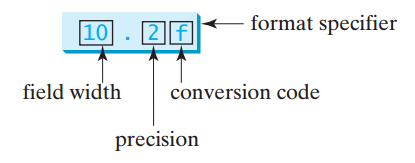
If the item is a float value, you can use the specifier to give the width and precision of the format in the form of width.precisionf. Here, width specifies the width of the resulting string, precision specifies the number of digits after the decimal point, and f is called the conversion code, which sets the formatting for floating point numbers. For example,
print(format(57.467657,"10.2f"))
print(format(12345678.923,"10.2f"))
print(format(57.4,"10.2f"))
print(format(57,"10.2f"))
displays
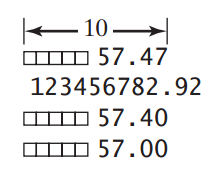
where a square box (口) denotes a blank space. Note that the decimal point is counted as one space.
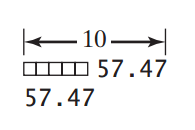
The format(“10.2f”)function formats the number into a string whose width is 10, including a decimal point and two digits after the point. The number is rounded to two decimal places. Thus there are seven digits allocated before the decimal point. If there are fewer than seven digits before the decimal point, spaces are inserted before the number. If there are more than seven digits before the decimal point, the number’s width is automatically increased. For example, format(12345678.923, “10.2f”) returns 12345678.92, which has a width of 11. You can omit the width specifier. If so, it defaults to 0. In this case, the width is automatically set to the size needed for formatting the number. For example,
print(format(57.467657, "10.2f"))
print(format(57.467657, ".2f"))
displays
-
Formatting in Scientific Notation
If you change the conversion code from f to e, the number will be formatted in scientific notation. For example,
print(format(57.467657, "10.2e"))
print(format(0.0033923, "10.2e"))
print(format(57.4, "10.2e"))
print(format(57, "10.2e"))
displays
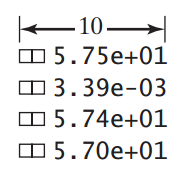
The + and - signs are counted as places in the width limit.
-
Formatting as a Percentage
You can use the conversion code % to format a number as a percentage. For example,
print(format(0.53457, "10.2%"))
print(format(0.0033923, "10.2%"))
print(format(7.4, "10.2%"))
print(format(57, "10.2%"))
displays
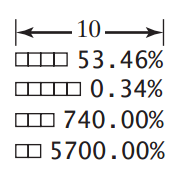
The format 10.2%causes the number to be multiplied by 100 and displayed with a % sign following it. The total width includes the %sign counted as one space.
-
Justifying Format
By default, the format of a number is right justified. You can put the symbol <in the format specifier to specify that the item be left-justified in the resulting format within the specified width. For example,
print(format(57.467657, "10.2f"))
print(format(57.467657, "<10.2f”))
displays
-
Formatting Integers
The conversion codes d, x, o, and b can be used to format an integer in decimal, hexadecimal, octal, or binary. You can specify a width for the conversion. For example,
print(format(59832, "10d"))
print(format(59832, "<10d"))
print(format(59832, "10x"))
print(format(59832, "<10x"))
displays
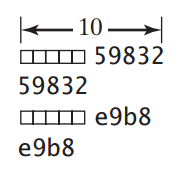
The format specifier 10d specifies that the integer is formatted into a decimal with a width of ten spaces. The format specifier 10x specifies that the integer is formatted into a hexadecimal integer with a width of ten spaces.
-
Formatting Strings
You can use the conversion code s to format a string with a specified width. For example,
print(format("Welcome to Python", "20s"))
print(format("Welcome to Python", "<20s"))
print(format("Welcome to Python", ">20s"))
print(format("Welcome to Python and Java", ">20s"))
displays
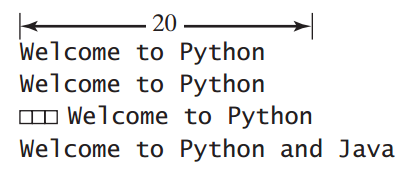
The format specifier 20s specifies that the string is formatted within a width of 20. By default, a string is left justified. To right-justify it, put the symbol >in the format specifier. If the string is longer than the specified width, the width is automatically increased to fit the string.
-
Frequently Used Specifiers
Specifier Format “10.2f” Format the float item with width 10 and precision 2. “10.2e” Format the float item in scientific notation with width 10 and precision 2. “5d” Format the integer item in decimal with width 5. “5x” Format the integer item in hexadecimal with width 5. “5o” Format the integer item in octal with width 5. “5b” Format the integer item in binary with width 5. “10.2%” Format the number in decimal. “50s” Format the string item with width 50. “<10.2f” Left-justify the formatted item. “>10.2f” Right-justify the formatted item.
Chapter 3 Selections
-
To generate a random number, you can use the randint(a, b) function in the random module. This function returns a random integer i between a and b, inclusively.
import random # Generate random numbers number1 = random.randint(0, 9) -
Python also provides another function, randrange(a, b), for generating a random integer between a and b – 1, which is equivalent to randint(a, b – 1). For example, randrange(0, 10) and randint(0, 9) are the same.
You can also use the random()function to generate a random float rsuch that 0 <= r < 1.0. For example,
>>> import random >>> random.random() 0.34343 >>> random.random() 0.20119 >>> random.randint(0, 1) 0 >>> random.randint(0, 1) 1 >>> random.randrange(0, 1) # This will always be 0 0 >>> -
if Statements
if boolean-expression: statement(s) # Note that the statement(s) must be indented -
Two-Way if-else Statements
if boolean-expression: statement(s)-for-the-true-case else: statement(s)-for-the-false-case -
Nested if and Multi-Way if-elif-else Statements
if score >= 90.0:
    grade = 'A'
else:
    if score >= 80.0:
        grade = 'B'
    else:
        if score >= 70.0:
            grade = 'C'
        else:
            if score >=60.0:
                grade = 'D'
            else:
                grade = 'F'
Equivalent
if score >= 90.0: grade = 'A' elif score >= 80.0: grade = 'B' elif score >= 70.0: grade = 'C' elif score >=60.0: grade = 'D' else: grade = 'F' -
Boolean Operators
Operator Description not logical negation and logical conjunction or logical disjunction For example,
# Receive an input
number = eval(input("Enter an integer: "))

if number % 2 == 0 and number % 3 == 0:
    print(number, "is divisible by 2 and 3")
if (number % 2 == 0 or number % 3 == 0):
    print(number, "is divisible by 2 or 3")

if (number % 2 == 0 or number % 3 == 0) and \
not (number % 2 == 0 and number % 3 == 0):
    print(number, "is divisible by 2 or 3, but not both")
Chapter 4 Loops
-
The while Loop
while loop-continuation-condition: # Loop body Statement(s) -
if you have a lot of data to enter, it would be cumbersome to type all the entries from the keyboard. You can store the data in a text file (named input.txt, for example) and run the program by using the following command:
python SentinelValue.py < input.txtThis command is called input redirection.
Suppose the file contains the following numbers, one number per line:
2
3
4
0
SentinelValue.py:
number = eval(input("Enter an integer: "))
max = number
while number != 0:
    number = eval(input("Enter an integer: "))
    if number > max:
        max = number
print("max is", max)
print("number", number)
The program should get sum to be 9.
Similarly, output redirection can send the output to a file instead of displaying it on the screen. The command for output redirection is:
python Script.py > output.txtInput and output redirection can be used in the same command. For example, the following command gets input from input.txt and sends output to output.txt:
python SentinelValue.py < input.txt > output.txtRun the program and we can see result show up in output.txt.

-
The for Loop
i = initialValue # Initialize loop-control variable
while i < endValue:
    # Loop body
    ...
    i += 1 # Adjust loop-control variable
A
forloop can be used to simplify the preceding loop:for i in range(initialValue, endValue): # Loop bodyIn general, the syntax of a
forloop is:for var in sequence: # Loop bodyA sequence holds multiple items of data, stored one after the other. Later in the book, we will introduce strings, lists, and tuples. They are sequence-type objects in Python. The variable var takes on each successive value in the sequence, and the statements in the body of the loop are executed once for each value. The function range(a, b) returns the sequence of integers a, a + 1, …, b - 2, and b -1. For example,
>>> for v in range(4, 8):
...     print(v)
...
4
5
6
7
>>>
The range function has two more versions. You can also use range(a) or range(a, b, k). range(a) is the same as range(0, a). k is used as step value in range(a, b, k). The first number in the sequence is a. Each successive number in the sequence will increase by the step value k. b is the limit. The last number in the sequence must be less than b. For example,
>>> for v in range(3, 9, 2):
...     print(v)
...
3
5
7
>>>
The step value in range (3, 9, 2) is 2, and the limit is 9. So, the sequence is 3, 5, and 7. The range(a, b, k) function can count backward if k is negative. In this case, the sequence is still a, a + k, a + 2k, and so on for a negative k. The last number in the sequence must be greater than b. For example,
>>> for v in range(5, 1, -1):
...     print(v)
...
5
4
3
2
>>>
Chapter 5 Functions
-
Defining a Function
The syntax for defining a function is as follows:
def functionName(list of parameters) # Function body -
Call Stacks
Each time a function is invoked, the system creates an activation record that stores its arguments and variables for the function and places the activation record in an area of memory known as a call stack. A call stack is also known as an execution stack, runtime stack, or machine stack, and is often shortened to just “the stack.” When a function calls another function, the caller’s activation record is kept intact and a new activation record is created for the new function call. When a function finishes its work and returns control to its caller, its activation record is removed from the call stack.
A call stack stores the activation records in a last-in, first-out fashion. The activation record for the function that is invoked last is removed first from the stack. Suppose function m1 calls function m2, and then m3. The runtime system pushes m1’s activation record into the stack, then m2’s, and then m3’s. After m3 is finished, its activation record is removed from the stack. After m2 is finished, its activation record is removed from the stack. After m1 is finished, its activation record is removed from the stack.
Understanding call stacks helps us comprehend how functions are invoked. When the main function is invoked, an activation record is created to store variables i and j. Remember that all data in Python are objects. Python creates and stores objects in a separate memory space called heap. Variables i and j actually contain reference values to int objects 5 and 2.
Invoking max(i, j) passes the values i and j to parameters num1 and num2 in the max function. So now num1 and num2 reference int objects 5 and 2. The max function finds the maximum number and assigns it to result, so result now references int object 5. The result is returned to the main function and assigned to variable k. Now k references int object 5. After the main function is finished, the stack is empty. The objects in the heap are automatically destroyed by the Python interpreter when they are no longer needed.
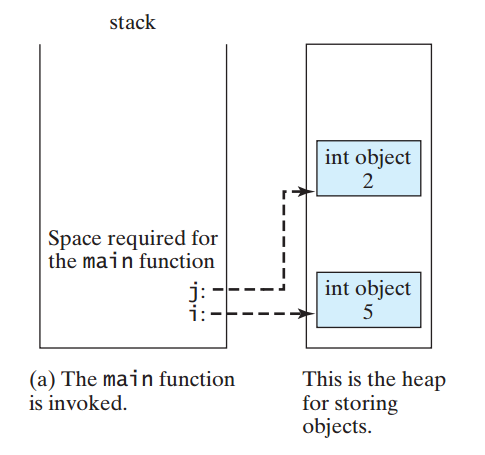
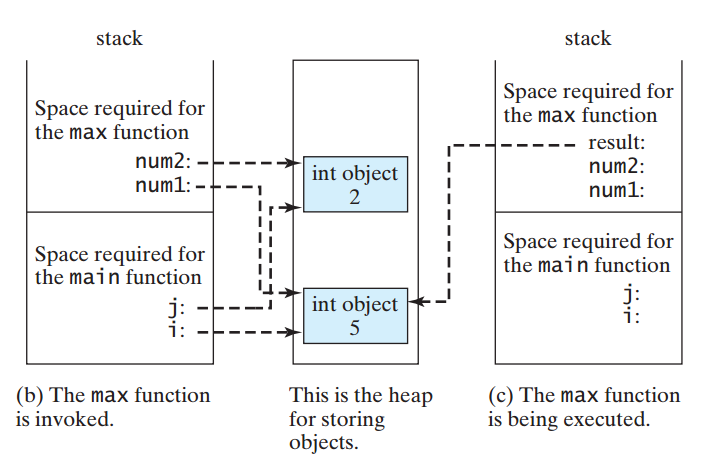
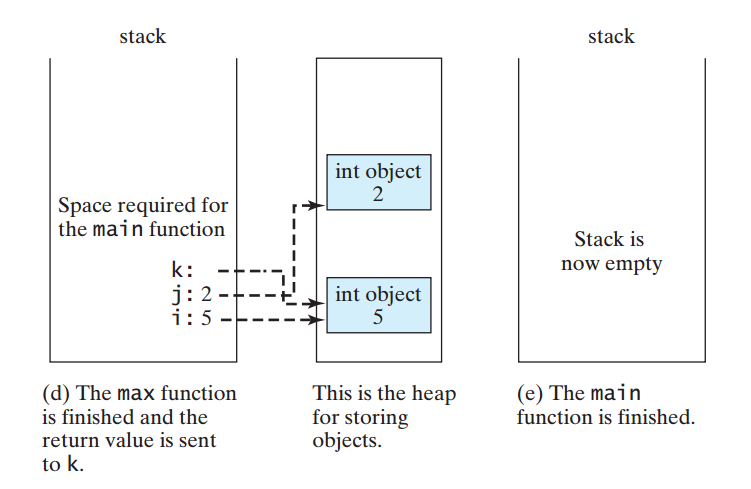
-
Technically, every function in Python returns a value whether you use return or not. If a function does not return a value, by default, it returns a special value None. For this reason, a function that does not return a value is also called a None function. The None value can be assigned to a variable to indicate that the variable does not reference any object.
A return statement is not needed for a None function, but it can be used for terminating the function and returning control to the function’s caller. The syntax is simply return or return None This is rarely used, but it is sometimes useful for circumventing the normal flow of control in a function that does not return any value. For example, the following code has a return statement to terminate the function when the score is invalid.
# Print grade for the score def printGrade(score): if score < 0 or score > 100: print("Invalid score") return # Same as return None if score >= 90.0: print('A') elif score >= 80.0: print('B') elif score >= 70.0: print('C') elif score >= 60.0: print('D') else: print('F') -
When calling a function, you need to pass arguments to parameters. There are two kinds of arguments: positional arguments and keyword arguments. Using positional arguments requires that the arguments be passed in the same order as their respective parameters in the function header. For example, the following function prints a message n times:
def nPrintln(message, n):
    for i inrange(n):
        print(message)
You can use nPrintln(‘a’, 3) to print a three times. The nPrintln(‘a’, 3) statement passes a to message, passes 3 to n, and prints a three times. However, the statement nPrintln(3, ‘a’) has a different meaning. It passes 3 to message and a to n. When we call a function like this, it is said to use positional arguments. The arguments must match the parameters in order, number, and compatible type, as defined in the function header.
You can also call a function using keyword arguments, passing each argument in the form name value. For example, nPrintln(n = 5, message = “good”) passes 5 to n and “good” to message. The arguments can appear in any order using keyword arguments.
It is possible to mix positional arguments with keyword arguments, but the positional arguments cannot appear after any keyword arguments. Suppose a function header is
def f(p1, p2, p3):You can invoke it by using
f(30, p2 = 4, p3 = 10)However, it would be wrong to invoke it by using
f(30, p2 = 4, 10)because the positional argument 10 appears after the keyword argument p2 = 4.
-
Because all data are objects in Python, a variable for an object is actually a reference to the object. When you invoke a function with arguments, the reference value of each argument is passed to the parameter. This is referred to as pass-by-value in programming terminology. For simplicity, we say that the value of an argument is passed to a parameter when invoking a function. The value is actually a reference value to the object.
If the argument is a number or a string, the argument is not affected, regardless of the changes made to the parameter inside the function.
def main():
    x = 1
    print("Before the call, x is", x)
    increment(x)
    print("After the call, x is", x)

def increment(n):
    n += 1
    print("\tn inside the function is", n)

main() # Call the main function
Before the call, x is 1 n inside the function is 2 After the call, x is 1
the value of x(1) is passed to the parameter n to invoke the increment function (line 4). The parameter n is incremented by 1in the function (line 8), but x is not changed no matter what the function does.
The reason is that numbers and strings are known as immutable objects. The contents of immutable objects cannot be changed. Whenever you assign a new number to a variable, Python creates a new object for the new number and assigns the reference of the new object to the variable.
Consider the following code:
>>> x = 4
>>> y = x
>>> id(x) # The reference of x
505408920
>>> id(y) # The reference of y is the same as the reference of x
505408920
>>>
You assign x to y, and both x and y now point to the same object for integer value 4, as shown in Figure 6.4a–b. But if you add 1 to y, a new object is created and assigned to y,Now y refers to a new object, as shown in the following code:
>>> y = y + 1 # y now points to a new int object with value 5 >>> id(y) 505408936 >>> -
In Python, you can place the function definition into a file called module with the file-name extension .py. The module can be later imported into a program for reuse. The module file should be placed in the same directory with your other programs. A module can contain more than one function. Each function in a module must have a different name. Note that the turtle, random, and math are the modules defined in the Python library, and thus they can be imported into any Python program.
GreatestCommonDivisor.py, shows a program that prompts the user to enter two integers and displays their greatest common divisor. You can rewrite the program to use a function and place it into a module named GCDFunction.py.
GCDFunction.py
# Return the gcd of two integers
def gcd(n1, n2):
    gcd = 1# Initial gcd is 1
    k = 2 # Possible gcd

    whilek <= n1 andk <= n2:
        if n1 % k == 0andn2 % k == 0:
            gcd = k # Update gcd
            k += 1

    return gcd  # Return gcd
Now we write a separate program to use the gcd function.
TestGCDFunction.py
from GCDFunction import gcd # Import the gcd function

# Prompt the user to enter two integers
n1 = eval(input("Enter the first integer: "))
n2 = eval(input("Enter the second integer: "))

print("The greatest common divisor for", n1,
"and", n2, "is", )
Line 1 imports the gcd function from the GCDFunction module, which enables you to invoke gcd in this program. You can also import it using the following statement:
import GCDFunctionUsing this statement, you would have to invoke gcd using GCDFunction.gcd.
What happens if you define two functions with the same name in a module? There is no syntax error in this case, but the latter function definition prevails.
-
The following code demonstrates how to define functions with default argument values and how to invoke such functions.
def printArea( ):
area = width * height
print("width:", width, "\theight:", height, "\tarea:", area)

printArea() # Default arguments width = 1 and height = 2
printArea(4, 2.5) # Positional arguments width = 4 and height = 2.5
printArea(height = 5, width = 3) # Keyword arguments width
printArea(width = 1.2) # Default height = 2
printArea(height = 6.2) # Default width = 1
Line 1 defines the printArea function with the parameters width and height. width has the default value 1 and height has the default value 2. Line 5 invokes the function without passing an argument, so the program uses the default value 1 assigned to width and 2 to height. Line 6 invokes the function by passing 4 to width and 2.5 to height. Line 7 invokes the function by passing 3 to width and 5 to height. Note that you can also pass the argument by specifying the parameter name, as shown in lines 8 and 9.
A function may mix parameters with default arguments and non-default arguments. In this case, the non-default parameters must be defined before default parameters.
Many programming languages support a useful feature that allows you to define two functions with the same name in a module, but it is not supported in Python. With default arguments, you can define a function once, and call the function in many different ways. This achieves the same effect as defining multiple functions with the same name in other programming languages. If you define multiple functions in Python, the later definition replaces the previous definitions.
-
Python allows a function to return multiple values.
defsort(number1, number2):
    if number1 < number2:
        return number1, number2
    else:
        return number2, number1

n1, n2 = sort(3, 2)
print("n1 is", n1)
print("n2 is", n2)